In this article, you will learn which steps to take if the invitation email is not delivered to one or more users and they are therefore unable to log into their account.
INHALTSVERZEICHNIS
Issue occurs for only one user
If the issue only affects a single user, please follow the steps below:
1. Check the email address
Make sure the user was created with the correct email address.
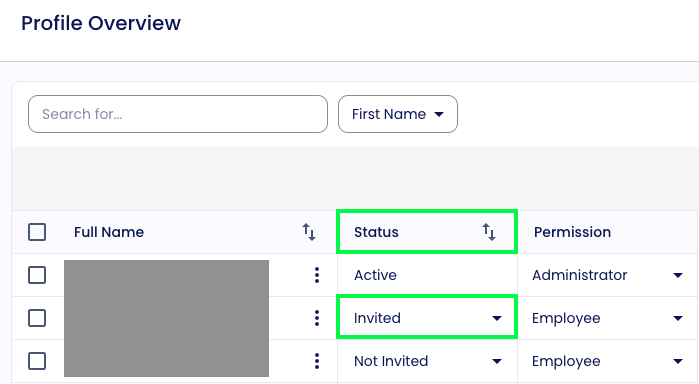
2. Check the invitation status
Ensure that the user has been invited and the invitation status is set to "Invitation sent".
→ https://lemontaps.com/md/profiles
3. Ask the user to check their spam folder
Ask the user to check their spam or junk folder, as some emails may be filtered there automatically.
4. Send a password reset
If the previous steps do not resolve the issue, send the user a password reset email:
Go to: https://lemontaps.com/login
Enter the user's email address
Click on "Forgot password"
The user will then receive an email to set a new password.
Once they log in successfully, their status will automatically change to "Active".
5. Contact Lemontaps Support
If none of the previous steps resolve the issue and the password reset email is also not received, please contact us at support@lemontaps.com.
Include the email address of the affected user so we can look into the case quickly.
Issue affects multiple or all users
If many or all users are not receiving the invitation email for their Lemontaps account, please contact your IT department.
They should check whether our emails are being blocked.
If that is the case, your IT can adjust the settings so that our emails are reliably delivered in the future.
Was this article helpful?
That’s Great!
Thank you for your feedback
Sorry! We couldn't be helpful
Thank you for your feedback
Feedback sent
We appreciate your effort and will try to fix the article