In this article, you’ll learn what you can do if your email signature is not displayed correctly.
TABLE OF CONTENTS
- 1. Signature and/or images are displayed incorrectly
- 2. Signature is displayed incorrectly when forwarding
- 3. Text or images are displayed differently on desktop and mobile
- 4. Other issues with the signature display
If your email signature is not displayed correctly, there can be several reasons. Below you’ll find explanations for the most common issues.
1. Signature and/or images are displayed incorrectly
This issue can occur if you are using an outdated version of Outlook (desktop or mobile).
Check whether you are using the latest version and update Outlook if necessary
Test the web version, as it is always up to date
If the issue persists, please contact our support at support@lemontaps.com.
To help us assist you as quickly as possible, please include the following information:
Any error messages
Screenshots or screen recordings
Does the issue affect only one user or multiple users?
The email address of the affected user
The Outlook version used (Desktop, iOS app, Android app, Web)
2. Signature is displayed incorrectly when forwarding
It can happen that the signature is displayed correctly in a new email, but images are missing or displayed incorrectly when forwarding or replying.
This is a known behavior in Outlook: when replying or forwarding, Outlook may internally convert the message to a different format (e.g. HTML → RTF or Plain Text). In longer email threads, embedded images in signatures may be removed or not transferred correctly.
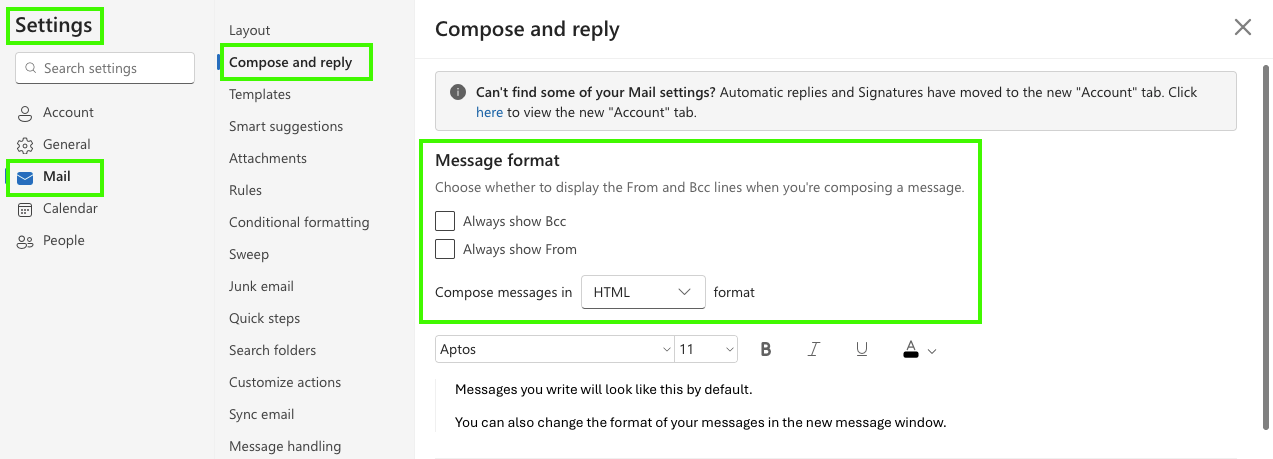
Tip: Make sure that replies and forwarded emails in Outlook are sent in HTML format (not RTF or Plain Text).
3. Text or images are displayed differently on desktop and mobile
To avoid text being displayed in different font sizes, make sure that a fixed font size is defined for the respective text field in the editor. Otherwise, the display may vary depending on the device.
To do this, click on the corresponding text field in the editor and set the desired font size in the right-hand sidebar under Configuration → Typography.
The same applies to images: it is also recommended to define fixed values for height and width (in pixels). This helps prevent inconsistent display across different devices.
4. Other issues with the signature display
The following table summarizes the most common display issues along with their solutions.
| Problem | Solution |
|---|---|
| Images or QR codes appear distorted, too large, or too small | Always upload images in their final target size (do not rely on CSS scaling only). Explicitly set width and height in the HTML. Do not use max-width or responsive techniques. Use PNG or JPG formats (no SVGs). Use table-based layouts () instead of div-based layouts. |
| Fonts, font sizes, or colors are incorrect | Use only web-safe fonts (e.g. Arial, Calibri, Verdana) and define fallback fonts. Set colors exclusively using HEX or RGB values. Do not use CSS variables, rem, or em units. Define important colors inline (style="color:#..."). |
| Text unexpectedly wraps to the next line or breaks | Use tables with fixed column widths. Explicitly set line-height (e.g. 1.4). Do not use Flexbox or Grid. Avoid long words, URLs, or email addresses, or insert deliberate line breaks. Prefer more spacious layouts. |
| Signature does not scale correctly on mobile devices | Do not rely on true responsiveness (media queries rarely work). Keep the overall signature width between 320–600 px. Stack content vertically instead of side by side. Keep images small and compact. Avoid nested tables with widths over 600 px. |
| Signature looks different in replies or forwards | Keep HTML as simple as possible. Avoid complex CSS selectors. Use a table-based layout. Ensure HTML, RTF, and plain-text versions are properly maintained. Accept that replies are often displayed in a reduced format. |
If you are experiencing a different issue with your signature, please contact our support at support@lemontaps.com.
To help us assist you quickly, please include the following information:
Any error messages
Screenshots or screen recordings
Does the issue affect only one user or multiple users?
The email address of the affected user
The Outlook version used (Desktop, iOS app, Android app, Web)
Was this article helpful?
That’s Great!
Thank you for your feedback
Sorry! We couldn't be helpful
Thank you for your feedback
Feedback sent
We appreciate your effort and will try to fix the article