.svg)
What is a Unit Admin?
A Unit Admin is an administrator with limited permissions for a specific unit within the organization. Unit Admins can manage users and content within their own unit but do not have access to organization-wide settings.
Which functions are visible and usable additionally depends on the permissions assigned by main administrators.
Example overview of user profiles visible to a Unit Admin:
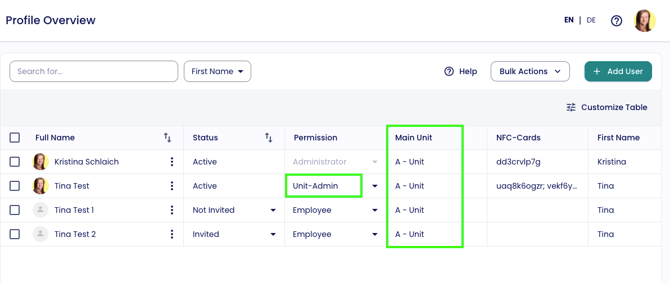
Unit Admin permissions can be customized individually
Main administrators can define which areas and functions Unit Admins are allowed to access. As a result, the visible interface of a Unit Admin may differ depending on the organization.
If a module or setting is restricted, the following message will appear:
“Your administrator has not allowed editing this setting for your unit.”
Permission Overview Table
The following table shows all functions and areas a Unit Admin can or cannot access, including requirements and restrictions.
| Function / Area | Unit Admin Access | Requirement / Restriction |
|---|---|---|
| View user profiles within own unit | Yes | Only for users within the assigned unit |
| Create user profiles | Yes | Only for users within the assigned unit |
| Edit user profiles | Yes | Only for users within the assigned unit |
| Delete user profiles | No | Main administrators only |
| Link / unlink NFC cards | Yes | Only for users within the assigned unit |
| Manage wallet functions | Yes | “Wallet Config” must be enabled under Roles & Permissions for unit admins |
| Manage email signatures | No | Main administrators only |
| View contacts within own unit | Yes | “Contacts” module must be enabled under admin visibility settings |
| Filter & search contacts | Yes | “Contacts” module must be enabled under admin visibility settings |
| Manage contact forms | No | Main administrators only |
| Order NFC cards | Yes | “Cards” module must be enabled under admin visibility settings |
| Order paper business cards | Yes | “Cards” module must be enabled under admin visibility settings |
| View card order approvals | Yes | “Cards” module must be enabled under admin visibility settings |
| Manage visibility settings | No | Main administrators only |
| Manage approvals | Yes | Only within the assigned unit |
| Manage profile design | Yes | “Profile Design” must be enabled under Roles & Permissions for unit admins |
| Manage translations | Yes | “Translations” must be enabled under Roles & Permissions for unit admins |
| Manage email templates | Yes | “E-Mail Templates” must be enabled under Roles & Permissions for unit admins |
| Manage QR code backgrounds | Yes | “QR Code Background Config” must be enabled under Roles & Permissions for unit admins |
| Manage wallet settings | Yes | “Wallet Config” must be enabled under Roles & Permissions for unit admins |
| Manage QR code settings | Yes | “QR Code Config” must be enabled under Roles & Permissions for unit admins |
| Manage users from other units | No | Not possible |
| Change organization settings | No | Main administrators only |
| Create new units | No | Main administrators only |
| Change organization-wide designs | No | Main administrators only |
| Access billing / invoices | No | Main administrators only |
| Manage payment information | No | Main administrators only |
| Manage licenses | No | Main administrators only |
| Manage subscriptions | No | Main administrators only |
| View contract information | No | Main administrators only |
| Manage roles & permissions | No | Main administrators only |
| Add main administrators | No | Main administrators only |
| Assign organization-wide permissions | No | Main administrators only |
| Configure SSO | No | Main administrators only |
| Configure SCIM | No | Main administrators only |
| Manage API settings | No | Main administrators only |
| Manage organization-wide integrations | No | Main administrators only |
| View analytics | No | Main administrators only |