In this article, you’ll learn where to find the profile links and QR codes for each user profile as an admin.
INHALTSVERZEICHNIS
Profile links
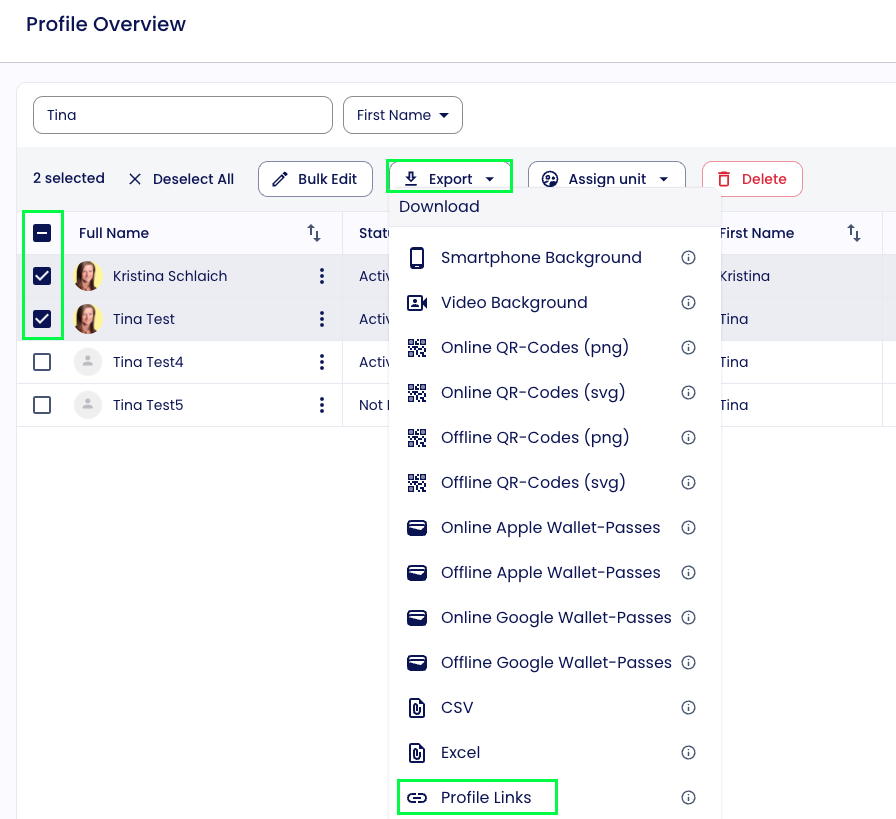
You can find the individual profile links of your employees as follows:
- Go to User Profiles.
- Select the desired contacts.
- Click Export.
- Choose Profile Links.
You will then receive an Excel file containing all profile links of the selected user profiles.
Profile QR codes
You can find the individual profile QR codes of your employees as follows:
- Go to User Profiles.
- Select the desired contacts.
- Click Export.
- Choose QR Codes.
You will then receive a ZIP file containing all QR codes of the selected user profiles.

Was this article helpful?
That’s Great!
Thank you for your feedback
Sorry! We couldn't be helpful
Thank you for your feedback
Feedback sent
We appreciate your effort and will try to fix the article