.svg)
Requirements: Administrator · Sales Add-on
When assigning an voice note, Lemontaps searches not only your Lemontaps contacts but also the contacts in your CRM. If no CRM contacts appear, this is usually due to one of the following reasons.
Cause 1: Importing contacts from the CRM is not allowed
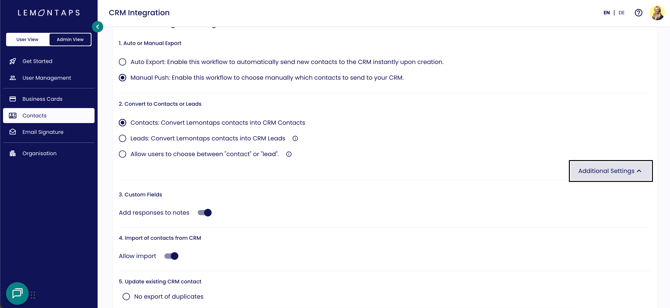
To search CRM contacts, importing contacts must be enabled in the CRM integration settings.
- In the admin view, go to Contacts → CRM Integration.
- Open Additional Settings.
- Enable the option to import contacts from the CRM.
- Then return to the AI note and search for the contact again via + Assign contact.
Cause 2: No CRM integration is connected
If no CRM integration has been set up, only Lemontaps contacts will be displayed. You can find instructions on how to connect your CRM in the relevant CRM article, such as HubSpot Integration or Salesforce Integration.
Cause 3: No internet connection in the app
Searching CRM contacts requires an internet connection. If you are using the app offline, CRM contacts will become available again once your device is back online. For more information, see the article Use the Lemontaps app offline.
If the contacts are still not displayed, contact support@lemontaps.com.