.svg)
In this article, you’ll learn where to find information about the number of license seats you’ve purchased and how many seats/profiles are currently in use.
License Seats vs. Used Seats/Profiles
License seats indicate the number of user profiles you have purchased.
Used seats, on the other hand, represent the number of active/in-use user profiles.
The number of purchased license seats is what you are billed for — not the number of active user profiles.
Where can I see my License Seats and Used Seats/Profiles?
You can view an overview of both purchased license seats and used seats/profiles by clicking on your profile picture in the top right corner and then navigating to Billing.
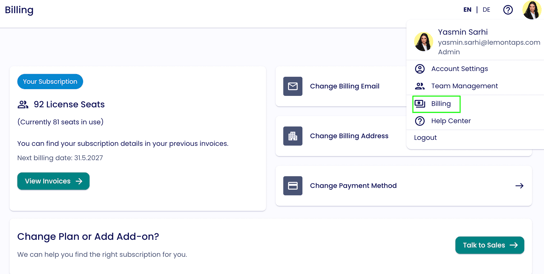
Note: Only users whose email address is stored as the primary billing contact can see all billing information.
→ Information on Change the Number of Licenses
→ Information on Access to Invoices