.svg)
Requirements: All users · Sales Addon
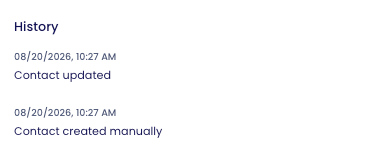
In the contact profile, you'll find an overview under "History" that shows how a contact was created and what activities have already taken place for it.
Where can I find the history?
- Open the Contacts overview
- Click on a contact to open its detail view
- Scroll all the way down to the "History" section
Administrators see the same history view as end users.
What information does the history show?
Creation date
For every contact, the history shows when it was created.
How was the contact captured?
The history shows which method was used to create a contact:
- Manually created contact
- Contact created via business card scanner
- Contact created via badge scanner
- Contact created via QR code
- Phone contact import: The contact was added from the smartphone's address book within the app
- CRM import: The contact was imported via a CRM integration
When was the contact updated?
If the contact form is edited, the history records when this update took place.
Voice Notes
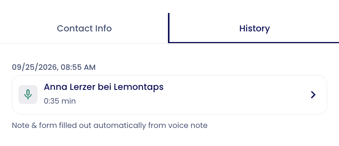
All voice notes associated with a contact are displayed in the History. This applies both to notes you record directly within the contact using Record note and to notes that are assigned to the contact later under AI Notes.
For each voice note, you can see who assigned it to the contact. Click the entry to open the voice note, including the transcript and all AI-generated results. For more information.
Automations
If an automation adds data to a contact after a voice note is recorded, this is also documented in the History. For example:
- The notes field was automatically filled with the transcript or a summary.
- The contact form was automatically filled in (Fill Form).
This allows you to see where information came from at any time.
Follow-up Mails
The history also shows whether and when a follow-up email was sent to the contact. For details, see the article Follow-up Email to Contacts.