.svg)
Brief Explanation
If invited users do not receive their invitation email, this is usually caused by an incorrect email address, a spam filter, or blocked delivery.
First, check: Does the problem affect only one user or multiple users?
Select the appropriate case and follow the corresponding section a) or b):
a) Problem affects a single user
Follow these steps in order:
-
Check the email address
Make sure the user was created with the correct email address.
-
Check the invitation status
In the Admin View under User Management → All user profiles, verify that the user has been invited and the invitation status shows “Invitation Sent.”
-
Check the spam/junk folder
Ask the user to check their spam or junk folder, as emails may sometimes be automatically filtered there.
-
Send a password reset email
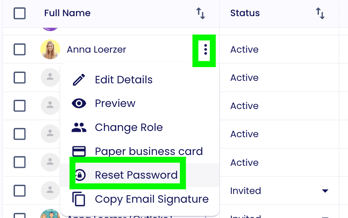
Open the three-dot menu next to the user and click “Reset Password.” The user can then set a new password and gain access to the platform via the email sent.
-
Contact Lemontaps Support
If the password reset email is also not delivered, please contact Lemontaps Support at:
Provide the affected user’s email address so the issue can be resolved quickly.
b) Problem affects multiple or all users
If multiple or all users are not receiving invitation emails, contact your IT department.
They should check whether emails from Lemontaps are being blocked or filtered.
The IT team can then adjust the settings to ensure that emails are delivered reliably in the future.