.svg)
Requirements: All users · Paid plan
This article explains which language a digital business card opens in on a visitor’s device. By default, the visitor’s device language is used, provided it is one of the profile languages. Otherwise, the fallback language is shown. You’ll also learn when a language previously selected on a business card or a Lemontaps login on the device takes priority over the device language.
Terms
- Visitor: the person who opens the business card on their device.
- Profile owner: the Lemontaps user the business card belongs to.
- Profile languages: the languages the business card is available in. They are defined in the admin view under Organisation › Translations. One of them is the input language, in which the profile content is maintained. Another one is the fallback language, usually English.
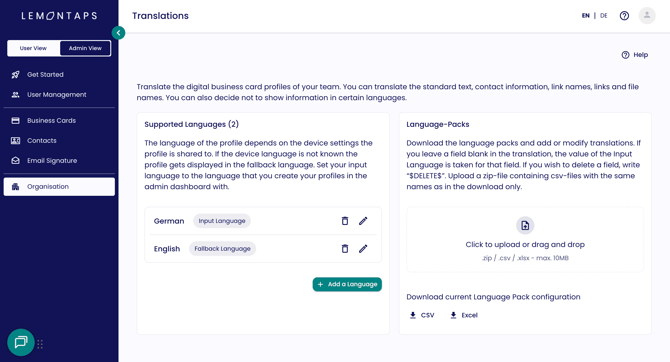
Supported languages under Organisation › Translations showing input and fallback language
If you want to define which languages your business card is available in and translate its content, read the article How do I translate the digital business card profile?
Standard case: first visit on the device
This is the most common case: you share your business card with someone who has never opened a Lemontaps business card before.
- If the device language is one of the profile languages, the business card opens in the device language.
- If the device language is not one of the profile languages, the business card opens in the fallback language.
Example: The profile languages are German and English, and the fallback language is English. If a visitor's smartphone is set to German (device language), they see the business card in German. If it is set to French, they see it in English, because French is not one of the profile languages.
Special case 1: the language was changed on a business card
If the visitor has already opened a Lemontaps business card on this device and changed the language there, that language is used instead of the device language. This applies to every business card they open on this device afterwards, not only to the one where they changed the language. The selected language is stored in the browser. If the visitor clears the cache, it is removed and the device language applies again.
Special case 2: login to Lemontaps on the device
If the visitor has already logged in to Lemontaps on this device, the language of their Lemontaps account is used instead of the device language. What counts is the setting at the time of their last login. This case takes priority over special case 1.
In both special cases: if the language determined this way is not one of the profile languages, the business card opens in the fallback language.
Order of priority at a glance
| Priority | Situation on the visitor's device | Language used |
| 1 | Has logged in to Lemontaps before | Language of the Lemontaps account (as at last login) |
| 2 | Has changed the language on a business card before | Language last selected on a business card |
| 3 | Neither of the above | Device language |
If the language used is not one of the profile languages, the fallback language is shown.