.svg)
If you're using Microsoft Edge and receive the error message "Server Error" when trying to download an Excel file, it's likely due to a specific browser setting.
Cause:
By default, Edge attempts to open Excel files directly in the browser. This can lead to issues when exporting from Lemontaps and trigger the error message.
Solution:
Here’s how to fix the issue:
-
Open the Settings in your Microsoft Edge browser.
-
Look for the option that controls how Office files are handled.
-
Disable the setting that opens Excel files directly in the browser.
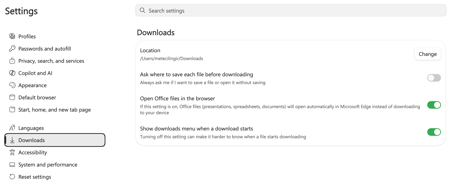
After changing this setting, downloading Excel files from Lemontaps should work without any issues.