.svg)
As an administrator, you can download the following assets for multiple or all users at once:
- Smartphone backgrounds
- Video backgrounds
- Online QR codes (PNG)
- Online QR codes (SVG)
- Offline QR codes (PNG)
- Offline QR codes (SVG)
- Online Apple Wallet passes
- Offline Apple Wallet passes
- Online Google Wallet passes
- Offline Google Wallet passes
- Profile links
Instructions
- Go to User Management → All User Profiles.
- Select the users you want to export.
- Click Export.
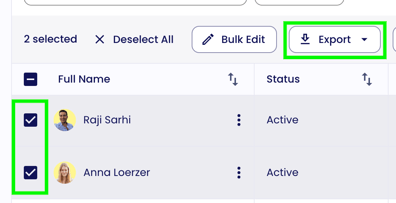
- Choose which assets you would like to download.
The selected files will then be generated automatically and downloaded to your device.