.svg)
With the Excel import, you can delete multiple user profiles in Lemontaps at once.
This is especially useful if you want to remove many users simultaneously and already have a corresponding list—e.g., during offboarding processes or for data cleanup.
Note: For details on what happens when deleting users, profiles, personal data, and statistics, see the article: “Deleting Users – Procedure and Impact.”
Step-by-Step: Delete Users via Excel
1. Open the Excel Importer
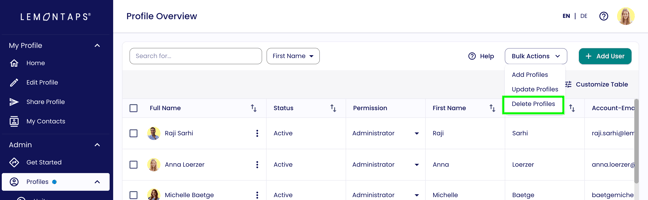
Go to User Management → All user profiles, click "Bulk Actions" in the top right, and select "Delete Profiles".
2. Create the Excel file
In the pop-up, you can download the Excel template.
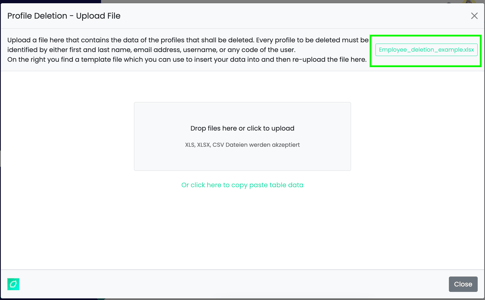
(Note: You can also use your own Excel file and map the columns to the correct fields in the next step.)
Each profile to be deleted must be uniquely identifiable. One identifier per user is sufficient, for example:
-
Email address (recommended)
-
First and last name
-
Username
Recommendation: Use the email address as the identifier, since it is unique.
Enter the identification data of the users to be deleted in the Excel file.
3. Upload the Excel file and map columns
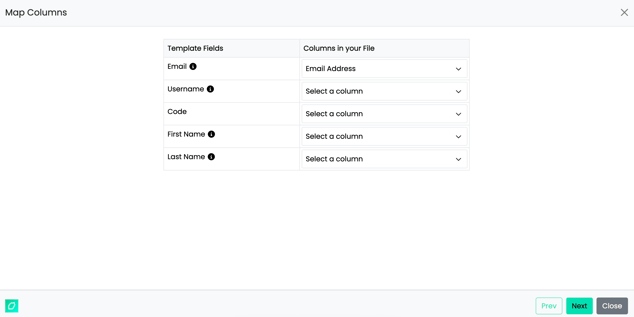
Upload the completed file in the pop-up. Map the column in your file to the corresponding Lemontaps field.
Since only one identifier is required, mapping a single column correctly is sufficient.
4. Review data & complete import
You will now see a preview of the user profiles to be deleted.
Carefully check that the selection is correct.
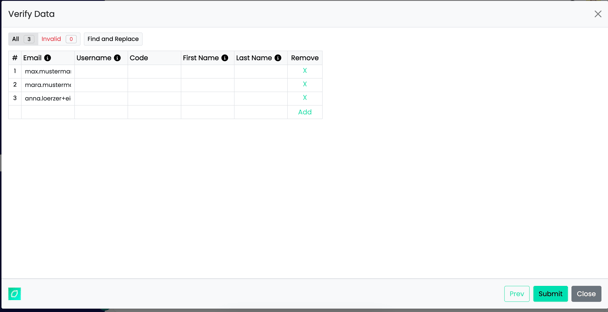
Click Submit to start the deletion process.
The process may take a few minutes. Refresh the page afterward.
Important Note for SCIM Users
Users managed via SCIM User Provisioning cannot be deleted directly in Lemontaps.
These users must be removed in your identity provider (e.g., Entra ID or Okta) and will then be automatically deleted in Lemontaps.