.svg)
In this article, you’ll learn how to delete users as an administrator in Lemontaps and what exactly happens when a user profile is removed.
Important note upfront
Users who are managed via SCIM User Provisioning cannot be deleted directly in Lemontaps.
These users must be removed from the provisioning scope or the assigned group in the connected identity provider (e.g. Entra ID or Okta). They will then be automatically deleted in Lemontaps.
Option 1: Delete users directly in the platform
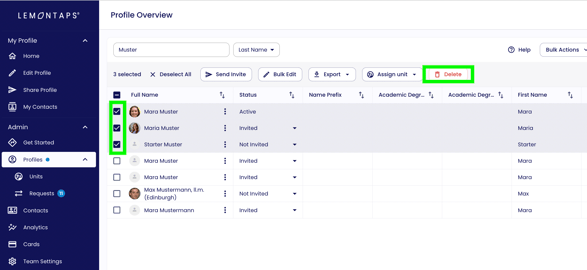
You can delete one or multiple users directly from the user list.
How to proceed:
-
Select one or more users using the checkboxes
-
Click "Delete"
-
Confirm the deletion
The selected users will then be removed from the platform.
Option 2: Delete users via Excel import
If you already have an Excel or CSV file containing the users to be deleted, you can use the Excel uploader to remove these profiles in bulk.
For more details, see the article:
→ Delete users via Excel import
What happens when a user is deleted?
When a user is deleted, the following rules apply:
-
The user profile is permanently and irreversibly deleted
-
All personal data of the user is removed
-
The user immediately loses access to their account
What remains:
-
Contacts that have already been collected in the admin view (only the owner is deleted; all other contact information remains available).

-
Organization-level statistics and reports.
These data remain available in anonymized form and can still be used for analysis.
This article answers the question of whether a deleted account can be restored:
Can a deleted account be restored?