.svg)
Deleting an account depends on your current plan and your role in the system.
1. Starter Plan (Free)
If you are using the free Starter plan, you can delete your account yourself:
- Go to your account settings
- Open the “Delete account” tab
- Enter your registered email address to confirm
- Confirm the deletion
Your account will then be deleted.
2. Single User Pro Plan
If you are on a Single User Pro plan, you cannot delete your account yourself.
In this case:
- Send an email to support@lemontaps.com
- The support team will handle the deletion for you
3. Team Member
If you are part of a team, you cannot delete your account yourself.
In this case:
- Contact your administrator
- They can delete your profile for you
How to check if you are part of a team:
- Click on the question mark icon
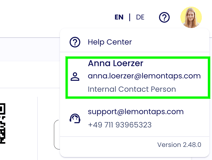
- You will see an internal contact person listed there
This person is your point of contact for account deletion.
4. Administrator (Team Admin)
As an administrator, you can delete accounts of other users.
You can find detailed instructions in the article:
“Delete users – process and impact”
5. Owner (Main Administrator)
If you are the owner (main administrator), you cannot delete your own account.
How to check if you are the owner:
- Try to delete your own profile under “Profiles”
- You will see a message indicating that this is not possible
In this case:
- Send an email to support@lemontaps.com
- The support team will handle the deletion for you