.svg)
With the CSS editor, you can customize the appearance of your digital business cards exactly the way you want. For example, you can change colors, font sizes, or the design of buttons.
Important: With CSS, you can only change the styling - not the layout. This means that you cannot influence the order of elements or their visibility.
Requirements
You should have a basic knowledge of CSS (Cascading Style Sheets) so that you can use the CSS editor effectively.
If you are not familiar with CSS, it is best to pass on your design requests to your IT department or a person with CSS experience.
How the editor works:
1. Open the CSS-editor in the Design-Settings.
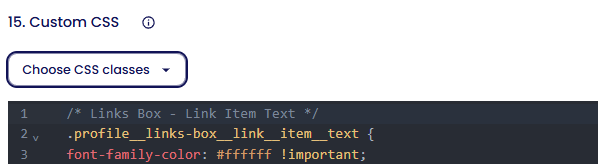
2. Only use our predefined CSS classes. To do this, use the “Select CSS class” button.

⚠️If you try to use your own class names by using the "Inspect" view, your changes may not work permanently. Only the class names provided by Lemontaps remain permanent.
3. Set the handle !important for every rule, to make everything is applied correctly.
/* Header Box - Container */
.profile__header-box {  background-color: #0055ff !important;

}!important ensures that your rule overrides all other styles for this element.
What can I do with CSS?
What you can change with CSS:
|
What you cannot change with CSS:
|