.svg)
With the Excel import, you can create multiple users and their digital business cards (profiles) in Lemontaps at once.
This is especially helpful if you want to add many employees at the same time or already have an existing Excel list (e.g., from HR or IT).
Video Tutorial
In this video, you can see the complete Excel import explained step by step:
Step-by-Step: Import Users & Profiles via Excel
1. Open the Excel Importer
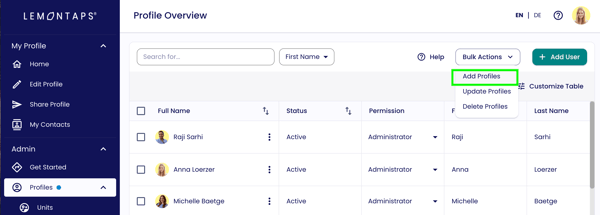
Go to User Management → All user profiles, click "Bulk Actions" in the top right, and select "Add Profiles".
2. Fill out the Excel file
In the pop-up, you can download the Excel template.
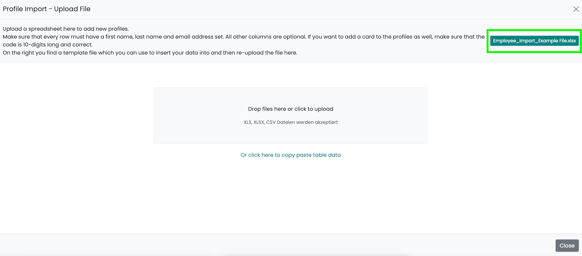
(Note: You can also use your own Excel file and map the columns to the correct fields in the next step.)
Fill the Excel template with your employees’ data in the corresponding columns. Required fields:
-
First Name
-
Last Name
-
Email Address
All other fields are optional.
Recommendation:
Enter only the individual contact details of the users in the Excel file.
Information that is the same for all profiles or certain subgroups (e.g., company name, address, website link, or company LinkedIn link) should be managed via standard content. This way, these details can be updated centrally and much faster later.
→ Set standard content for profiles
Set individual links
You can already include and name an individual LinkedIn link in the Excel template.
To learn how to add more individual links via Excel, see:
3. Upload the Excel file and map columns
Upload your Excel or CSV file in the same pop-up.
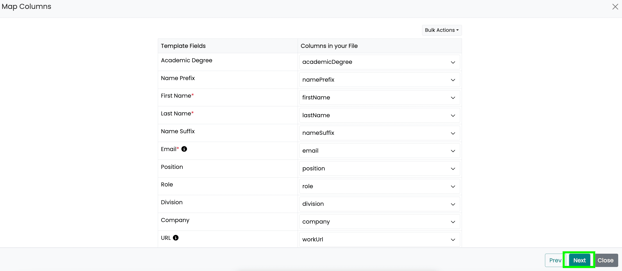
Then map the columns of your file to the corresponding Lemontaps fields. If you use the Lemontaps Excel template, most fields are automatically mapped correctly. Click "Next" to continue.
4. Review data & complete import
You will now see a preview of all users and profiles to be created:
-
Invalid or missing entries are highlighted in red
-
You can correct errors directly here
-png.png?width=611&height=267&name=image-png-2%20(1)-png.png)
When everything is correct, click "Submit".
The users and their digital business cards will now be created in Lemontaps. This process may take a few minutes. Refresh the page afterward to see the new users.