.svg)
Prerequisites: Administrator · Paid Plan · Sales Add-on
With data mapping, you can define that Lemontaps automatically transfers specific results to a designated CRM field during CRM export – for example, the name of an event, AI-enriched information, or data captured via the business card scanner. This means you no longer have to enter this information manually.
How to set up data mapping
1. Open Contacts → Contact Fields2. Select the desired field and click the three dots → Edit field
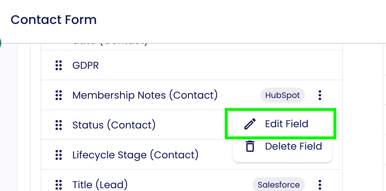
3. Scroll down to the Data Mapping section and click Enable data mapping
4. Select the Lemontaps field you want to map to this CRM field from the dropdown menu
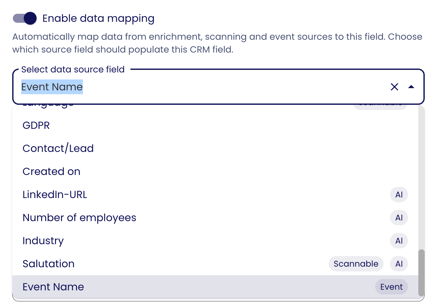
5. Click Save
From now on, this CRM field will automatically be populated with the mapped Lemontaps value during export.
Which Lemontaps fields are available?
The available fields are divided into three groups:
Enrichment (Badge: AI)
Fields that are populated through automatic AI contact enrichment:
First Name, Last Name, Email, Work Email, Work Phone, Mobile Phone, Company, Website, LinkedIn URL, Country, Salutation, Number of Employees, Industry, Job Title, City, Profile Picture
Scan (Badge: Scannable)
Fields that are captured from a physical business card using the OCR scanner:
Name Prefix, First Name, Last Name, Job Title, Company, Work Phone, Mobile Phone, Address Line 1, ZIP Code, City, Country, Email, Work Email, Website, and Language.
Event Name
The name of the Lemontaps event through which the contact was captured. This is especially useful if you want to track in your CRM which event a lead originated from. The field is populated automatically, so the user does not have to enter anything when capturing the contact.
Data types must match
For the mapping to work, the Lemontaps field and the CRM field must have the same data type. A text field in Lemontaps can only be mapped to a text field in the CRM —a mapping to a dropdown field is not possible.