.svg)
What Is Account Claiming?
Account Claiming automatically assigns users to your organization as soon as they self-register using an email domain you have verified (e.g. @company.com).
This ensures that no isolated individual accounts are created and that all users are managed centrally within Lemontaps.
When Is Account Claiming Useful?
Account Claiming is particularly relevant in the following scenarios:
Use Case 1: Users self-register via the website
It is common for users to register directly via the Lemontaps website or to already have an account before Lemontaps is officially introduced company-wide.
Without Account Claiming:
-
The user creates an individual account without team assignment
-
Central administration is not possible
-
You cannot manage the account from the central admin area
With Account Claiming:
-
The account is automatically assigned to your team
-
The user can be managed centrally
Use Case 2: Users should be able to self-register when needed
If you do not want to create users manually in advance, Account Claiming allows for an open but controlled registration process.
Typical example:
-
You share the registration link (www.lemontaps.com/registration/signup) in your intranet
-
Employees register themselves using their company email address
-
The accounts are automatically added to your team
You can see what this looks like from the user’s perspective here:
→ Account Claiming – User Experience
Difference from SSO:
If Single Sign-On (SSO) is in use, Account Claiming is usually not required, as users are automatically assigned via your organization’s identity provider.
Account Claiming is mainly used when SSO is not available or intentionally not used.
Set Up Account Claiming
Step 1: Requirement – Verify your email domain
You can find detailed instructions in the article:
→ Verify Email Domain – Basics & Setup
Step 2: Activate Account Claiming
Once the domain has the status “Verified”, you can define how users are assigned to your organization.
To do this, open the Email Domains page.
You can choose between two options: automatic or manual.
a) Automatic Account Claiming
-
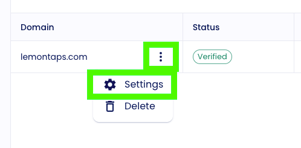
Open the domain settings via the three-dot menu
-
Enable automatic assignment of new users
-
Define which unit new users should be assigned to by default (e.g. Global). Result: All users who register with this domain in the future will be automatically added to your team.
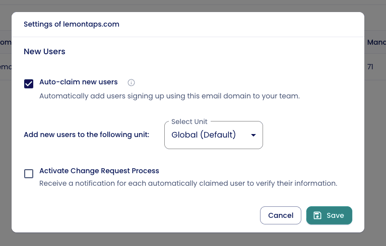
Note: Optionally, you can be notified whenever a new user is added via Account Claiming.
To do this, enable the second checkbox “Enable approval process.”
b) Manual Account Claiming
-
Click "Import accounts"
-
Download the list of all registered users with your domain
-
Select which accounts should be claimed
-
Complete the import
The users will then appear in the user overview.