---
title: Content templates
description: Learn how to create and manage content templates for addresses, links, and files in Lemontaps. Enable administrators and employees to use standardized profile content across the company.
---
[Skip to content](https://support.lemontaps.com/en/content-templates#main-content)
- [English](https://support.lemontaps.com/en/content-templates)
- [Deutsch](https://support.lemontaps.com/de/inhaltsvorlagen)
English
Show submenu for translations
.svg)
- Start
- Produkte
- Preise
- Blog
- Unternehmen
Open main navigation
Close main navigation
- Start
- Produkte
- Preise
- Blog
- Unternehmen
- - [English](https://support.lemontaps.com/en/content-templates)
- [Deutsch](https://support.lemontaps.com/de/inhaltsvorlagen)
English
Show submenu for translations
- [Contact us](mailto:support@lemontaps.com)
[Contact us](mailto:support@lemontaps.com)
How can we help you?
- There are no suggestions because the search field is empty.
1. [Lemontaps Helpdesk](https://support.lemontaps.com/en?hsLang=en)
2. [Central User Management](https://support.lemontaps.com/en/central-user-management?hsLang=en)
3. [Manage Profile Content](https://support.lemontaps.com/en/central-user-management?hsLang=en#manage-profile-content)
June 29, 2026
# Content templates
***Note:** Content templates can only be created and managed by administrators on a paid plan.*
### What are content templates?
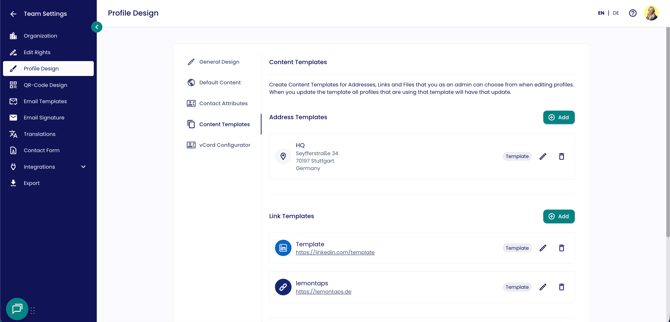
[Content templates](https://lemontaps.com/md/settings/profile-design?tab=contentTemplates) are templates that you create once and that administrators — and optionally employees — can select from. You can create content templates for addresses, links, and files.
There are 2 options:
- Only administrators can always select from content templates
- It can be configured so that both administrators and employees can select from content templates
You can find the content templates under [Organisation → Content Templates](https://lemontaps.com/md/settings/profile-design). Here, you can create new templates or edit existing ones.
Note: Templates currently cannot be configured based on units, meaning they always apply to all employees in the company. If a template is updated, the changes are automatically applied to all profiles using that template.
If you want to define templates as default content that should appear the same across all profiles, take a look at the article “[Set Up Default Content](https://support.lemontaps.com/en/define-default-content?hsLang=en)”.
If you want to create templates for contact attributes, such as a dropdown list for different job positions, check out the article “[Customize Profile Fields](https://support.lemontaps.com/en/customize-profile-fields-?hsLang=en)”.
How do I use the templates?
Once you have created templates for addresses, links, or files, you can use them as follows:
For administrators:
If you are an administrator, you can select from templates while editing employee profiles by navigating to the [profile overview](https://lemontaps.com/md/profiles), selecting an employee, and then choosing from your templates in the relevant field (address, link, or file).
For employees:
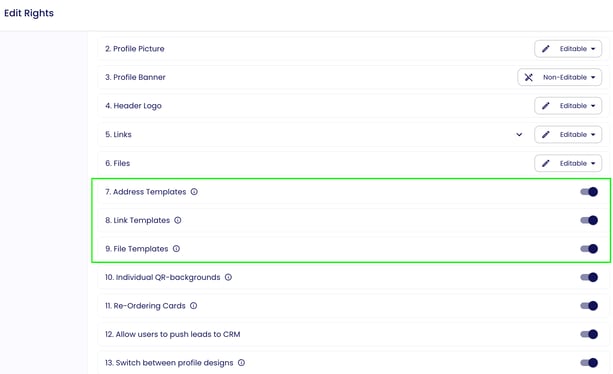
If you want your employees to independently select templates in their own profiles, you can adjust the editing permissions accordingly.
To do this, navigate to [Organisation → Roles & Permissions](https://lemontaps.com/md/settings/edit-rights).
Under 7. Address Templates, 8. Link Templates, and 9. File Templates, you can enable or disable templates for employees.
For employees:
Employees can also select and add templates in their [profiles](https://lemontaps.com/edit-profile), depending on their editing permissions.
In the following videos, you can see how employees can select from the created templates in their profiles.
| Adressvorlagen | Link-Vorlagen | Dateivorlagen |
| --- | --- | --- |
| | | |
- [Central User Management](https://support.lemontaps.com/en/central-user-management?hsLang=en#main-content)
- [User Management](https://support.lemontaps.com/en/central-user-management?hsLang=en#user-management)
- [Email & Communication](https://support.lemontaps.com/en/central-user-management?hsLang=en#email-communication)
- [Roles, Permissions & Approvals](https://support.lemontaps.com/en/central-user-management?hsLang=en#roles-permissions-approvals)
- [Manage Profile Content](https://support.lemontaps.com/en/central-user-management?hsLang=en#manage-profile-content)
- [Bulk Management & Imports](https://support.lemontaps.com/en/central-user-management?hsLang=en#bulk-management-imports)
- [Organization & structure](https://support.lemontaps.com/en/central-user-management?hsLang=en#organization-structure)
- [White-Label](https://support.lemontaps.com/en/central-user-management?hsLang=en#white-label)
- [Identity & Security](https://support.lemontaps.com/en/central-user-management?hsLang=en#identity-security)
- [Integrations](https://support.lemontaps.com/en/integrations?hsLang=en#main-content)
- [Identity & User Management](https://support.lemontaps.com/en/integrations?hsLang=en#identity-user-management)
- [CRM Integrations](https://support.lemontaps.com/en/integrations?hsLang=en#crm-integrations)
- [Other Integrations](https://support.lemontaps.com/en/integrations?hsLang=en#other-integrations)
- [Digital Business Card](https://support.lemontaps.com/en/digital-business-card?hsLang=en#main-content)
- [Share Digital Business Card](https://support.lemontaps.com/en/digital-business-card?hsLang=en#share-digital-business-card)
- [Design & Layout](https://support.lemontaps.com/en/digital-business-card?hsLang=en#design-layout)
- [NFC card](https://support.lemontaps.com/en/digital-business-card?hsLang=en#nfc-card)
- [Lead capture](https://support.lemontaps.com/en/lead-capture?hsLang=en)
- [Email signature](https://support.lemontaps.com/en/email-signature?hsLang=en#main-content)
- [Centralized email signatures (Outlook)](https://support.lemontaps.com/en/email-signature?hsLang=en#centralized-email-signatures-outlook)
- [Manual email signatures](https://support.lemontaps.com/en/email-signature?hsLang=en#manual-email-signatures)
- [Email signature design](https://support.lemontaps.com/en/email-signature?hsLang=en#email-signature-design)
- [Paper business card ordering system](https://support.lemontaps.com/en/paper-business-card-ordering-system?hsLang=en)
- [Legal & Data Protection](https://support.lemontaps.com/en/legal-data-protection?hsLang=en)
- [Troubleshooting & Problem Resolution](https://support.lemontaps.com/en/troubleshooting-problem-resolution?hsLang=en#main-content)
- [Login & Access Issues](https://support.lemontaps.com/en/troubleshooting-problem-resolution?hsLang=en#login-access-issues)
- [Email signature – issues](https://support.lemontaps.com/en/troubleshooting-problem-resolution?hsLang=en#email-signature-issues)
- [Technical Diagnostics](https://support.lemontaps.com/en/troubleshooting-problem-resolution?hsLang=en#technical-diagnostics)
- [Feature & Function Issues](https://support.lemontaps.com/en/troubleshooting-problem-resolution?hsLang=en#feature-function-issues)
- [Paper Card Ordering System – Issues](https://support.lemontaps.com/en/troubleshooting-problem-resolution?hsLang=en#paper-card-ordering-system-issues)
- [NFC & Hardware – Issues](https://support.lemontaps.com/en/troubleshooting-problem-resolution?hsLang=en#nfc-hardware-issues)
- [SCIM problems](https://support.lemontaps.com/en/troubleshooting-problem-resolution?hsLang=en#scim-problems)
- [Account & Security](https://support.lemontaps.com/en/account-security?hsLang=en#main-content)
- [Account Settings](https://support.lemontaps.com/en/account-security?hsLang=en#account-settings)
- [Billing & Subscription](https://support.lemontaps.com/en/billing-subscription?hsLang=en#main-content)
- [Trial Period & Plans](https://support.lemontaps.com/en/billing-subscription?hsLang=en#trial-period-plans)
- [Invoices & Payments](https://support.lemontaps.com/en/billing-subscription?hsLang=en#invoices-payments)
- [Licenses & Cancellation](https://support.lemontaps.com/en/billing-subscription?hsLang=en#licenses-cancellation)
# Lemon Innovation & Technology GmbH
[mailto:support@lemontaps.com](mailto:support@lemontaps.com)
Copyright © 2026, Lemon Innovation & Technology GmbH
```json
{
"@context" : "https://schema.org",
"@type" : "VideoObject",
"contentUrl" : "https://147299393.fs1.hubspotusercontent-eu1.net/hubfs/147299393/video_assets/404460727528/inherited/web_optimized.mp4",
"dateModified" : "2026-05-13T11:55:57.763Z",
"duration" : "PT28S",
"height" : 1390,
"name" : "Bildschirmaufnahme 2026-05-13 um 13.53.36",
"thumbnailUrl" : "https://147299393.fs1.hubspotusercontent-eu1.net/hubfs/147299393/Bildschirmaufnahme%202026-05-13%20um%2013.53.36.mov/medium.jpg",
"uploadDate" : "2026-05-13T11:55:43.430Z",
"width" : 1164
}
```
```json
{
"@context" : "https://schema.org",
"@type" : "VideoObject",
"contentUrl" : "https://147299393.fs1.hubspotusercontent-eu1.net/hubfs/147299393/video_assets/398348425425/inherited/web_optimized.mp4",
"dateModified" : "2026-04-30T08:01:34.439Z",
"duration" : "PT14S",
"height" : 1176,
"name" : "Bildschirmaufnahme 2026-04-30 um 09.58.48",
"thumbnailUrl" : "https://147299393.fs1.hubspotusercontent-eu1.net/hubfs/147299393/Bildschirmaufnahme%202026-04-30%20um%2009.58.48.mov/medium.jpg",
"uploadDate" : "2026-04-30T08:01:09.826Z",
"width" : 1224
}
```
```json
{
"@context" : "https://schema.org",
"@type" : "VideoObject",
"contentUrl" : "https://147299393.fs1.hubspotusercontent-eu1.net/hubfs/147299393/video_assets/398348471483/inherited/web_optimized.mp4",
"dateModified" : "2026-04-30T08:01:59.267Z",
"duration" : "PT12S",
"height" : 1176,
"name" : "Bildschirmaufnahme 2026-04-30 um 09.59.42",
"thumbnailUrl" : "https://147299393.fs1.hubspotusercontent-eu1.net/hubfs/147299393/Bildschirmaufnahme%202026-04-30%20um%2009.59.42.mov/medium.jpg",
"uploadDate" : "2026-04-30T08:01:09.117Z",
"width" : 1224
}
```
```json
{
"@context" : "https://schema.org",
"@type" : "VideoObject",
"contentUrl" : "https://147299393.fs1.hubspotusercontent-eu1.net/hubfs/147299393/video_assets/398350457042/inherited/web_optimized.mp4",
"dateModified" : "2026-04-30T08:02:37.400Z",
"duration" : "PT13S",
"height" : 1176,
"name" : "Bildschirmaufnahme 2026-04-30 um 10.00.10",
"thumbnailUrl" : "https://147299393.fs1.hubspotusercontent-eu1.net/hubfs/147299393/Bildschirmaufnahme%202026-04-30%20um%2010.00.10.mov/medium.jpg",
"uploadDate" : "2026-04-30T08:02:20.991Z",
"width" : 1224
}
```